Article #40 (extra edition)
Published: 24 November 2026
By Stan van Gemert | S10 Group
By Stan van Gemert
Special edition series



Our companion analysis, "The Extortion Trap Begins Before the Ransom Note", examines how your organisation retains control over decisions as extortion pressure develops, including protective action that need not wait for a payment decision. This analysis addresses the complementary question: how your organisation retains control over consequences when one necessary account, device or session is compromised.
One compromised account does not have to become an organisation-wide crisis. Yet a university cannot exclude its students, a hospital needs its specialists and partners, and many employers depend on people working remotely. Necessary access brings a risk that cannot be removed simply by closing the connection.
The question for risk management is control over consequences:
How much damage can one compromised device, account or session cause before it is stopped?
Answering it means looking beyond the first login to the systems and information behind it, the action that interrupts an attack and the work affected by that action.
On 15 September 2026, an attacker compromised an external guest account at the Technical University of Denmark, DTU. The account had no general rights at the university. Three days later, the attacker had obtained extensive administrator rights in its identity system and extracted a large amount of data.
DTU subsequently warned that information relating to up to 200,000 current and former users might have been affected. It could not establish precisely which information had been downloaded or how many people were affected.
The guest account was the starting point. The damage depended on the weaknesses and additional access the attacker could reach from there.
DTU, a Danish technical university, discovered a cyberattack on 20 September 2026. The intrusion had begun five days earlier with a compromised external guest account.
The attacker used that account to explore weaknesses in DTU’s identity system. After intercepting a new guest student’s credentials during a password reset, the attacker registered a second authentication factor and entered the network through its remote-access service. Further weaknesses led to administrator rights and large-scale data extraction on 18 September.
DTU restricted access to the identity system, reset system credentials and later required active users to change their passwords. Its 2 October notice said information about up to 200,000 users might have been affected. Potentially exposed information included Danish civil registration numbers and, for active users, home addresses and next-of-kin details.
Why it matters here:
The initial account’s limited rights did not define the eventual damage. The route to additional authority determined how far the intrusion travelled.
Sources and further reading:
Technical University of Denmark - Timeline of the cyberattack on DTU
https://www.dtu.dk/english/about/contact/it-information/timeline-of-the-cyberattack
Technical University of Denmark - Cyberattack on DTU: Notification of a personal data breach
https://www.dtu.dk/english/newsarchive/2026/10/cyberattack-on-dtu_notification-of-a-personal-data-breach
Students need learning platforms, email and research resources. Researchers collaborate with people whose devices and accounts belong to other institutions. Refusing those connections would obstruct the work a university exists to support.
Other organisations face their own versions of that tension. A hospital exchanges information with specialists and diagnostic partners. A manufacturer needs supplier support. A public service needs citizens to use its online services. The access differs, but each connection serves a business or public purpose.
Security controls still matter at every entrance. Passwords, additional authentication checks, software updates and restrictions on access all reduce exposure. Necessary access does not, however, make every accepted device or account permanently safe.
For your risk assessment, that creates two separate questions: why the connection is needed, and what happens if someone else takes it over. The first explains its business value. The second reveals the loss your organisation could face while that access remains usable.
Remote working expanded rapidly during the pandemic and has become an established part of many organisations. The current Dutch return-to-office debate illustrates how deeply it is embedded. In November 2026, Nieuwsuur reported that almost half of more than 3,000 FNV survey respondents had organised their lives around working from home.
An employer may manage the laptop, account and remote-access software while the home router, private computers and smart devices around them remain outside its direct control. Sharing that network does not itself give every device access to the business. The relevant connection appears when a stolen password, an exposed session or compromised software opens a usable route into work systems.
The LastPass attack shows that route clearly: compromise of an engineer’s home computer led to privileged credentials and corporate cloud backups. At Uber, the company said malware on a contractor’s personal device was the likely starting point for exposed corporate credentials.
Those incidents do not make every home connection unsafe. They explain why a risk assessment cannot depend on the employer controlling everything at the other end.
In the second stage of its 2022 breach, LastPass says an attacker exploited third-party software on a senior engineer’s home computer and installed a keylogger. Captured credentials opened the engineer’s corporate vault, which held secrets used to reach cloud backups. The stolen backup data included customer vault data with encrypted sensitive fields, alongside unencrypted information. The home compromise mattered because of the privileged access behind it.
Uber’s September 2022 account describes a different route. The company said an attacker likely bought a contractor’s corporate password after malware infected the contractor’s personal device. Repeated authentication requests followed; one was eventually approved. The attacker reached other employee accounts and internal tools. Uber restricted accounts and tools while its public-facing services continued.
These older cases explain the mechanism behind the current working arrangement. The November 2026 FNV survey supplies social context, not a measure of cyber risk or a representative finding about every Dutch employee.
Sources and further reading:
LastPass - 03-01-2023: Security Incident Update and Recommended Actions
https://blog.lastpass.com/posts/security-incident-update-recommended-actions
The Record - LastPass says attacker hacked employee’s home computer to access corporate vault
https://therecord.media/lastpass-attacker-hacked-engineers-home-computer-keylogger
Uber - Security update
https://www.uber.com/gb/en/newsroom/security-update/
NOS Nieuwsuur - Helft van de thuiswerkenden wil niet zomaar terug naar kantoor
https://nos.nl/nieuwsuur/artikel/2638666-helft-van-de-thuiswerkenden-wil-niet-zomaar-terug-naar-kantoor
On 14 September 2026, a Sophos employee opened a job-interview repository in Visual Studio Code. Altered workspace settings caused a terminal to download and run malware. The installed security agent was not functioning, and an industry partner reported the compromise the following day.
Sophos revoked sessions and reset the password, but a separate application authorisation survived those actions. It was used for 27 unauthorised read requests against two internal source-code repositories before being revoked. Sophos reported no impact on customers or customer-facing systems. Ending one session had not removed every usable route.
In a separate incident reported in September 2025, people claiming to represent Medusa offered BBC reporter Joe Tidy 15%, later 25%, of a proposed ransom for providing access. He consulted colleagues, and the BBC disconnected his access as a precaution after repeated authentication requests. It was an attempted recruitment, not a confirmed successful intrusion into the BBC.
Sources and further reading:
Sophos - INC-2026-002: Developer Job Lure Repository Leads to Malware Execution on a Sophos Employee Mac
https://www.sophos.com/en-us/trust/root-cause-analyses/inc-2026-002
BBC News - ‘You’ll never need to work again’: Criminals offer reporter money to hack BBC
https://www.bbc.com/news/articles/c3w5n903447o
Imagine two external research accounts with the same login checks. Both are needed to upload project files. One has access only to a separate upload area; the other also has permissions over shared project folders and a server used by several teams. A security report might list both as protected accounts. The losses following a compromise would be very different.
For the first account, the question is whether the separation holds, including against attempts to gain further access. For the second, the review already has a wider set of research records and services to consider. The difference matters when deciding whether current protection is sufficient or additional protection justifies investment.
Reconnaissance is the work of finding those opportunities. An attacker checks which servers respond, where sensitive information is held and which accounts have greater privileges. At DTU, exploring the identity system led from a guest account to control over other users and a large-scale extraction.
That changes the question your risk team can put beside the access request. Alongside “How do we reduce the chance of compromise?” sits “How much damage follows if this account is taken over?” Both matter. A low estimated likelihood does not describe the consequences of an account that reaches critical shared systems.
The term assume breach expresses that planning choice: design for the possibility that one accepted device, account or session becomes compromised. It leaves room to test what stops the attacker next, rather than treating successful prevention as the only acceptable outcome. See more details on how attackers use reconnaissance →
The University of Copenhagen’s 27 October 2026 update said external access to several systems had been restricted the previous day. Incoming network traffic was blocked while systems received individual security assessments before a controlled reopening.
The university prioritised its course system, Absalon, and other systems used by students and staff. Access largely required physical presence or a staff VPN connection. It explicitly said the closed systems had not been compromised; the restrictions were precautionary.
The case shows the operational cost of protecting shared services during uncertainty. It does not establish that a narrower restriction was technically impossible or that a particular product would have avoided the decision.
Sources and further reading:
University of Copenhagen - Update on cyber attack and shutdown
https://news.ku.dk/all_news/2026/10/update-on-cyber-attack-and-shutdown/
“Remote access is protected” says little about the loss that follows if one connection is taken over. A more useful record follows one necessary connection through to the business outcome. Your security specialists can establish the technical reach; the people running the service can explain what depends on it. Risk management brings those findings together.
For the research partner’s upload account, the review follows what it can reach beyond the upload area, which action stops harmful activity and whether suspending the account also blocks work by the project team. That makes six questions useful:
The result may be a narrower account, an additional containment control or an explicitly accepted remaining risk. The work can still require access while the way it is provided needs changing. A test of one file share supports a finding about that share and scenario. Other systems and routes need their own basis.
The connection that supports your mission may need to remain available: a researcher collaborating, a specialist reviewing information or a colleague working from home. Its value explains why your organisation grants access. It does not settle what happens if that access is taken over.
A defensible risk decision connects the work to the potential loss, the protection that stops further damage and the exposure that remains.
That is control over consequences: necessary access can remain available without giving one compromise unlimited reach.
If one necessary account is compromised, what keeps that one account from becoming a much larger loss?
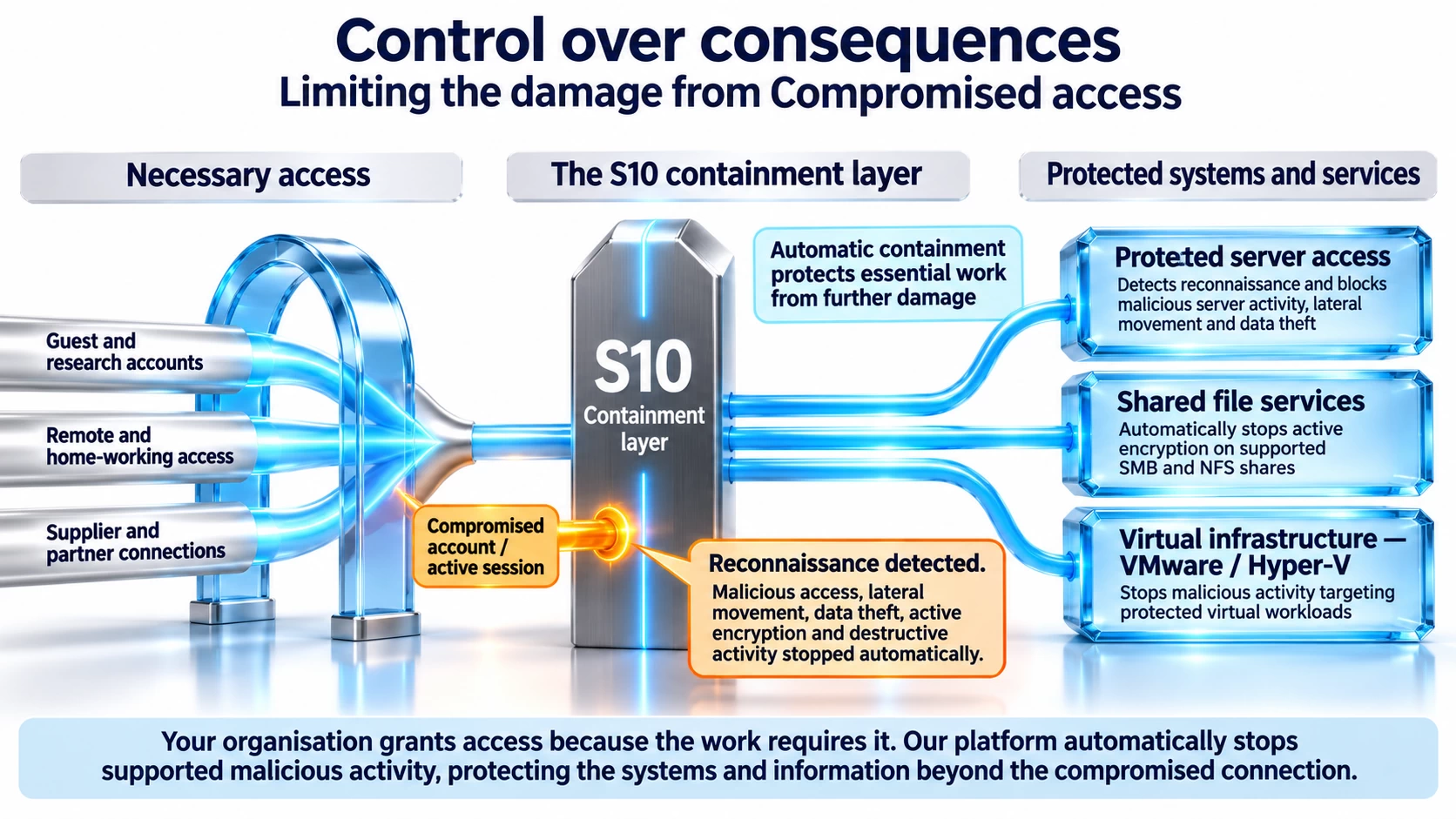
When prevention is bypassed, our platform stops supported malicious activity in the protected environment. The employee, student or partner account may already be compromised. The next outcome changes when that access is used to approach protected servers, encrypt shared files or damage virtual infrastructure.
Our Server Intrusion Protection exposes and traps intruders attempting remote access to protected servers, including those using compromised administrator credentials. It detects reconnaissance, automatically blocks unauthorised access and interrupts malicious server activity, including lateral movement and data theft. Stopping that route protects the systems and information the attacker was trying to reach next.
If the attacker starts encrypting files instead, Ransomware Containment detects active encryption on supported SMB and NFS file services without endpoint agents and automatically cuts off its source. Depending on the configured response, it disables the affected account in Active Directory, disables the device’s network adapter or shuts down the device. Stopping further encryption prevents additional file damage and the restoration work that damage would create.
Virtual Server Protection extends protection to supported VMware and Hyper-V environments. In supported VMware ESXi deployments, it detects and stops malicious encryption or corruption of protected system files and virtual-machine images. Those images hold the machines that run business services; protecting them prevents an attack at that layer from destroying the protected workloads.
Whether the intrusion begins with a guest account, a home-working connection or a compromised corporate device, the business concern is what the attacker reaches next. In the research-account example, blocking malicious access to another protected server prevents that route from carrying the attack into further projects and records. Cutting off active encryption protects additional shared files, while stopping destructive activity at the virtual-infrastructure layer protects the services running there. Your responders investigate the original compromise with those interventions already in effect.
See more details on our platform and its protection layers →
A conversation about your access model and the platform’s supported scenarios is a useful starting point. Our controlled Resilience Assessment then demonstrates one specific outcome: what happens when active ransomware encryption starts against agreed test resources.
Your existing security controls remain active throughout. The agreed scenarios run first without Ransomware Containment and then with it enabled, showing the change when automatic containment intervenes. The assessment is conducted remotely in a prepared, isolated test environment and is free for organisations with more than 250 employees.
Server Intrusion Protection and Virtual Server Protection can be presented and explained alongside those results.
The controlled assessment makes that difference visible in the agreed scenario.
Our platform provides an automatic containment layer where compromised access becomes malicious activity. It detects reconnaissance and automatically blocks unauthorised access on protected server routes, stopping lateral movement and data theft. It also cuts off active encryption and stops destructive activity against protected virtual workloads. Those interventions prevent the further loss that would otherwise follow while your responders investigate the original compromise. Your organisation still needs to grant students, employees and partners access to the systems and information their work requires. Automatic containment changes the outcome when that access is abused, protecting the information and services beyond the intervention and saving the time and money their loss would cost.
The next scheduled publication, “The Board Sees the Outcome. Teams Carry the Pressure”, follows the work behind a service that has reopened. Manual checks and unfinished integration work can still require exceptional capacity. The article examines how a recovery update makes that continuing demand visible before temporary support is withdrawn or committed elsewhere.
Wednesday 25 Nov 2026, Leadership-series #12: "The Board Sees the Outcome. Teams Carry the Pressure."
Friday 27 Nov 2026, Operational Attack-series #12: "When One Compromise Becomes Every Virtual Machine"
Monday 30 Nov 2026, Resilience-series #13: "When Vulnerability Meets Control, the Outcome Changes"